
Tablet Menu Guide: Definition, Benefits, and How to Create One
Last Updated: March 13, 2026
QR code menus and mobile browsing are now a common restaurant ordering system. But not every customer will want a digitized dining experience.
Sticking to traditional paper menus might seem like the simplest solution to accommodate these diners.
Yet recent studies by Zipdo also prove that 70% of diners prefer digital menus over paper ones nowadays, depicting a drastic change in consumers' dining preferences.
To address this challenge and the increasing consumer demand, a growing number of restaurants today offer tablet menus.
This creates more inclusive dining and also optimizes operations alongside the overall customer experience.
What is a tablet menu, and how does it work?
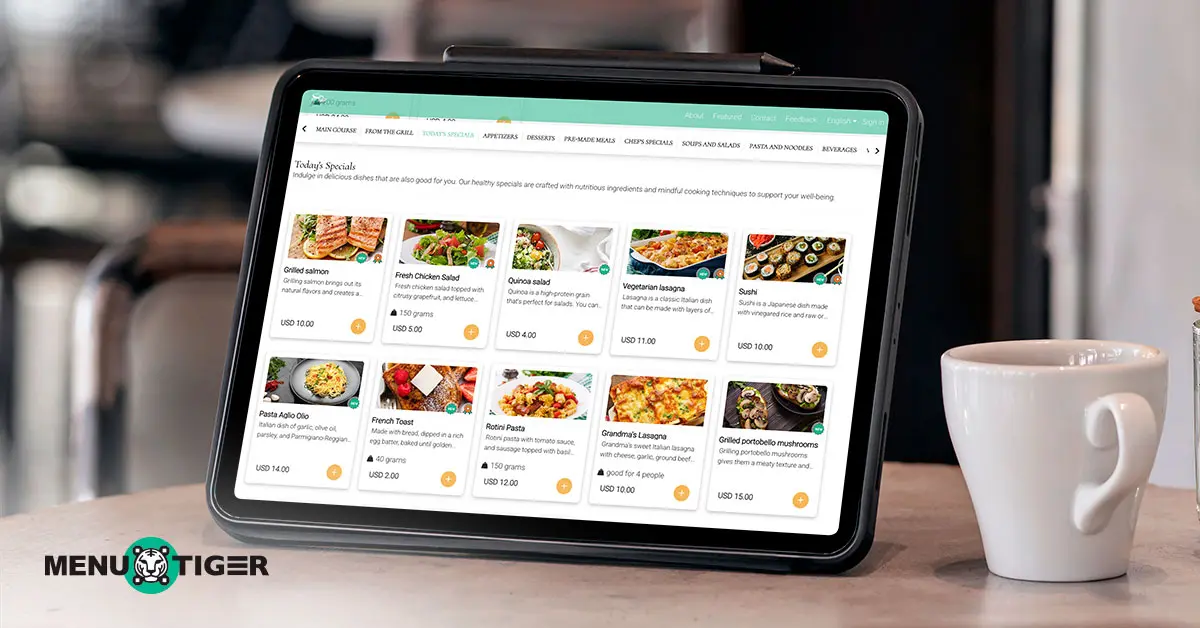
A tablet menu is a digital menu displayed on a tablet device provided by the restaurant (such as an iPad or Android tablet) in which customers browse food and drinks, place orders, or call staff.
The image below illustrates how the restaurant order system works step by step:
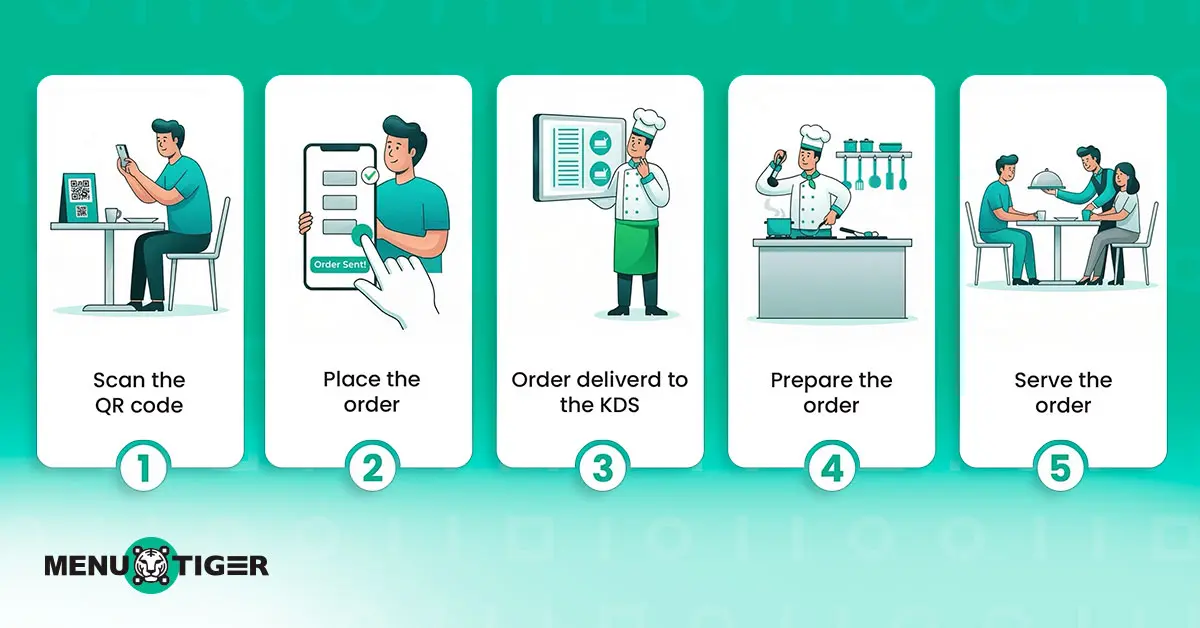
This shows how the system is easy for customers and effortless for restaurant operators.
Moreover, tablet-based menus are usually connected to a centralized system used by the restaurant, which ensures that orders route directly into several features, including:
- Kitchen Display System (KDS)
Orders go straight to the kitchen screen for faster preparation.
- Table management system
Tracks which tables have placed orders and update the server workflow in real time.
- Marketing and promotions
Collect customers’ data for personalized offers and services
- Analytics and reports
Collects sales data from the menu for insights on popular items and revenue.
- Accounting system
Syncs sales and transactions from orders for easier bookkeeping.
This menu acts as the central hub of a broader restaurant system. Once customers order through the menu, it collects data that enables other features to function smoothly, making it a restaurant order management system as a whole.
Two types of digital menu tablet: view-only and interactive
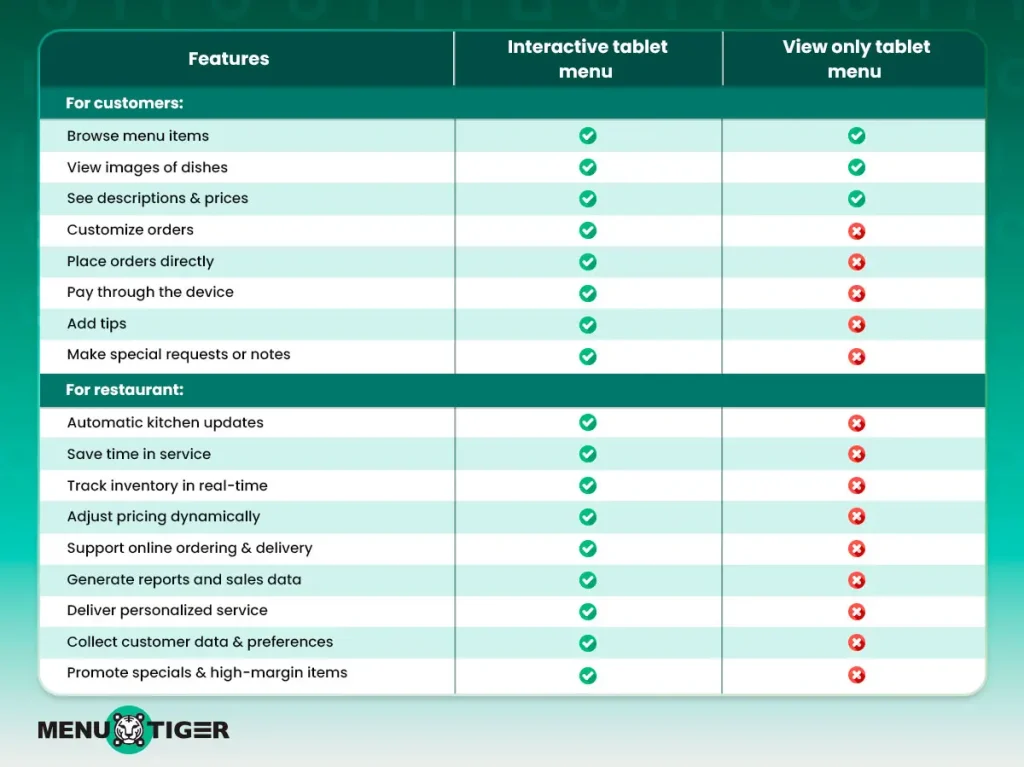
To further differentiate this restaurant technology and help you decide on one, here’s a clear breakdown of what it can do:
Menu tablet key takeaway:
A view-only menu is literally a digital version of the printed and static menu on a tablet. Customers can view the items but cannot order or interact with the menu.
An interactive menu lets customers order, pay, and even tip directly from the tablet.
So, if all you want to do is a digital replacement for printed menus, then a read-only menu will already accomplish that.
For restaurants looking to enhance customer experience and streamline overall operations, the interactive menu offers far better long-term value.

5 benefits of a tablet-based restaurant menu
There are a lot of compelling advantages to implementing restaurant ordering with tablets, such as quick and easy updates and an automated ordering system, to name a few.
Check out the top five reasons why digital menus are part of the new menu trends and why many restaurants have now switched to this technology:
1. Inclusive and easy to use
Diners without a compatible device or the know-how to use restaurant technology may struggle to place their orders. This is your main challenge.
Tablet-based menus solve this by allowing all customers to access and interact with your menu, even those without smartphones or digital experience.
Beyond providing the device, accessible digital menu systems are designed for maximum accessibility, catering to both non-tech-savvy diners and individuals with disabilities — something traditional menus often overlook.
2. Enhance overall management and operation
Beyond the benefits for customers, restaurant operations also gain significant advantages from using digital menus.
Numerous customers' success stories have shown that this sort of menu streamlines the order management process, minimizes errors during the ordering process, and improves service speed while providing valuable data for decision-making.
Tablet -based menus make life easier for restaurants and allow them to work more effectively, make better business decisions and provide a better dining experience for staff and guests alike.
3. Maximizes staff productivity and improves customer service
A heavy and unmanageable workload is one of the main triggers for workplace stress, according to ComPsych, an employee assistance program.
Using tablets for independent restaurant ordering can release the burden of excessive work from the staff, thus bringing down employee turnover.
Staff do not have to bring menus, take orders or process payments manually anymore.
This process enhances productivity by removing waiters from more menial tasks, giving them time to focus on customer service and hospitality.
4. Faster ordering and payments
A study entitled “How Can Restaurant Waiting Time Experience Influence Different Customer Groups’ Waiting Time Satisfaction”, shows that long waiting times can negatively affect a customer's perception of the restaurant.
With a menu available on tablets, customers are able to order and pay by themselves, which helps in decreasing the wait time.
The self-ordering and online payment feature can double table turnover, thereby making the restaurant management more efficient during peak hours.
5. Better marketing ROI
Digital menus give restaurants the opportunity to show certain dishes more transparently than with printed menus.
Tablet menus can showcase:
- High-margin items
- Best-selling dishes
- New menu additions
- Seasonal promotions
Visual images, banners, and recommendations with unique selling propositions can influence customers' decisions, resulting in a 33% increase in sales according to Nielsen, an audience measurement company.
How to create an interactive menu faster and easier with AI
MENU TIGER’s AI menu maker allows restaurant owners to create a digital menu in under 5 minutes by simply uploading their printed menus, which are then automatically converted into a digital version.
Here’s how:
1. Sign in or create an account.
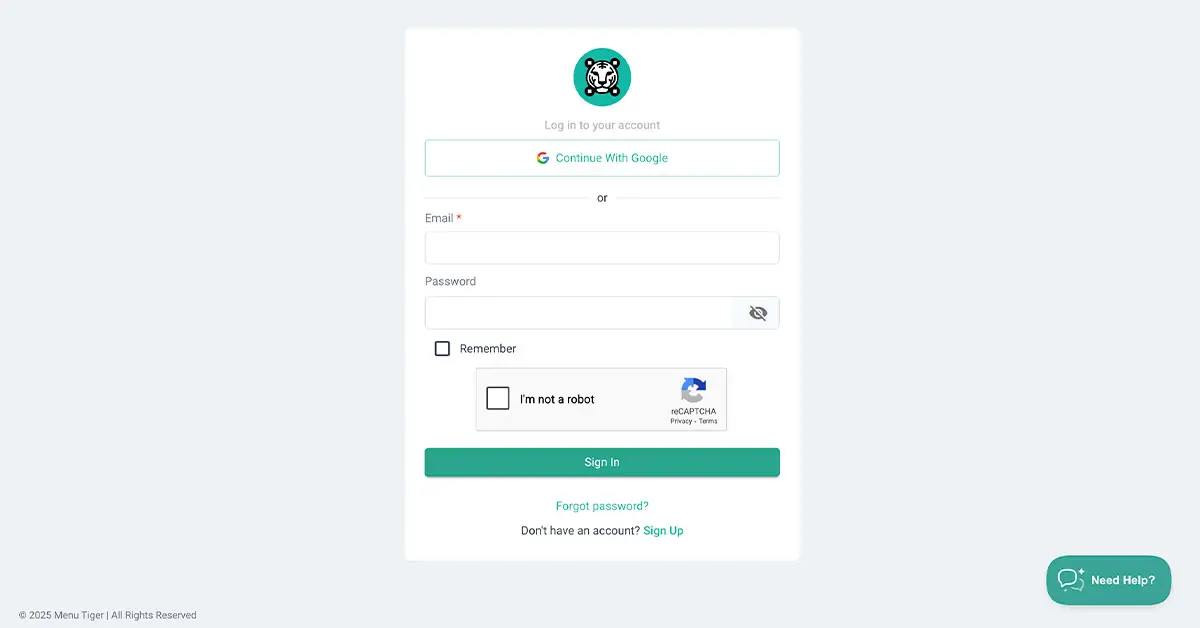
Go to the MENU TIGER website and sign in if you already have an account. If you’re new, sign up using your Google account or register with your email to get started.
2. Go to the MENU section
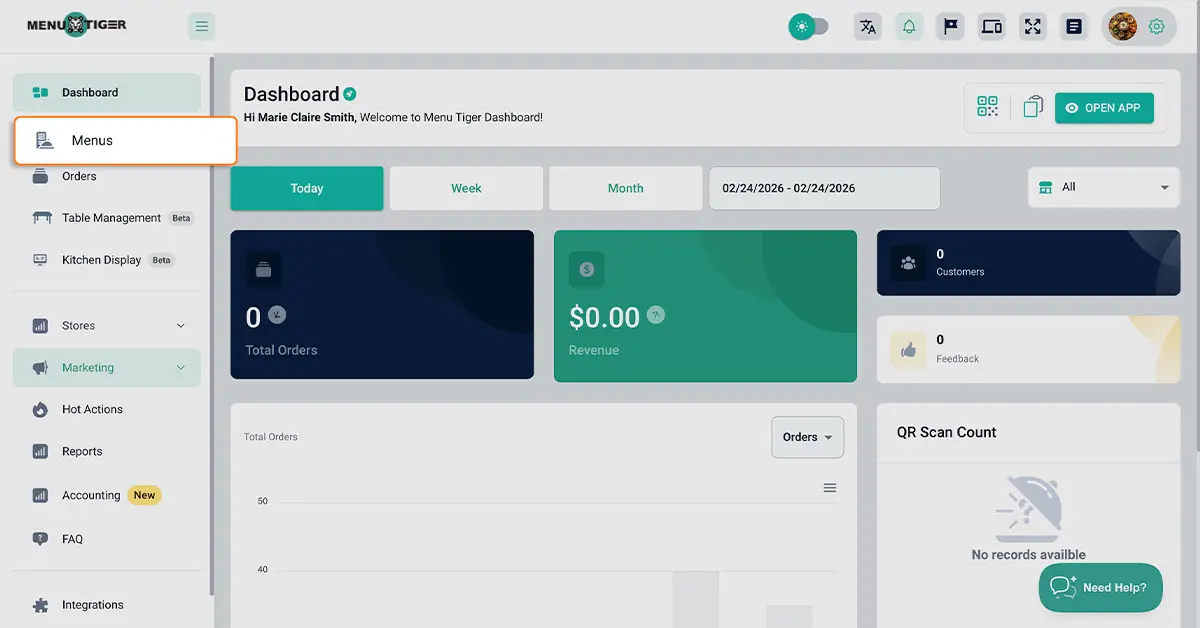
From the dashboard, click the Menu section to open the main menu management page.
3. Click the + Card and select Set Up Menu.
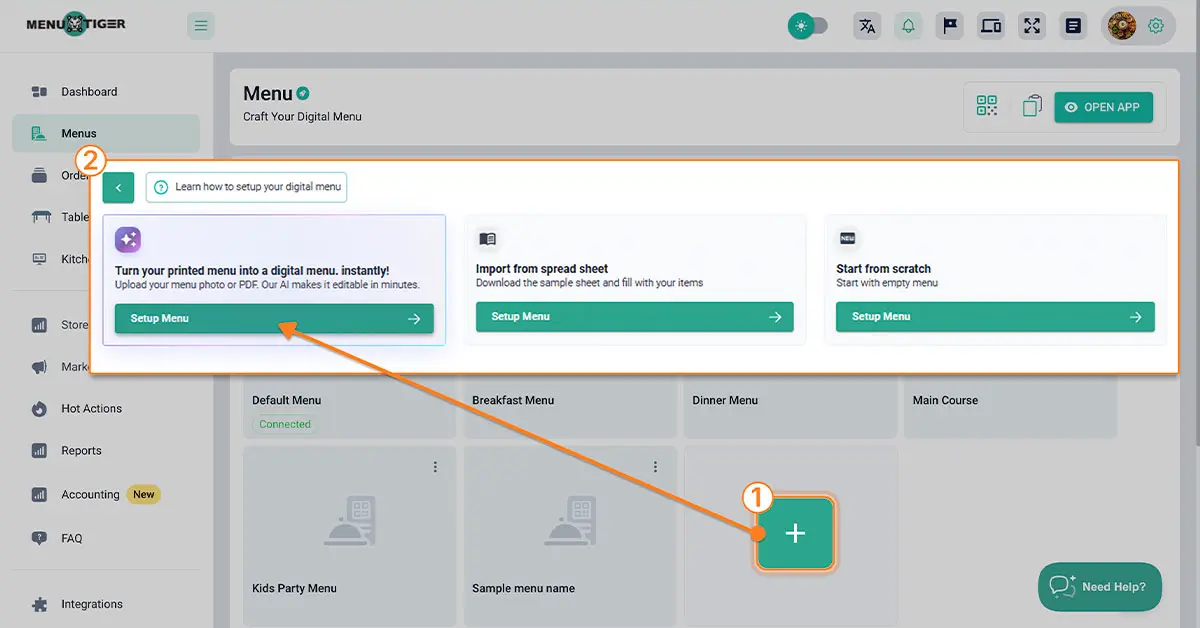
Click the + button to open the menu creation interface, then choose Set Up Menu under the AI Menu Maker card.
4. Tap the upload box to choose and upload your menu file.
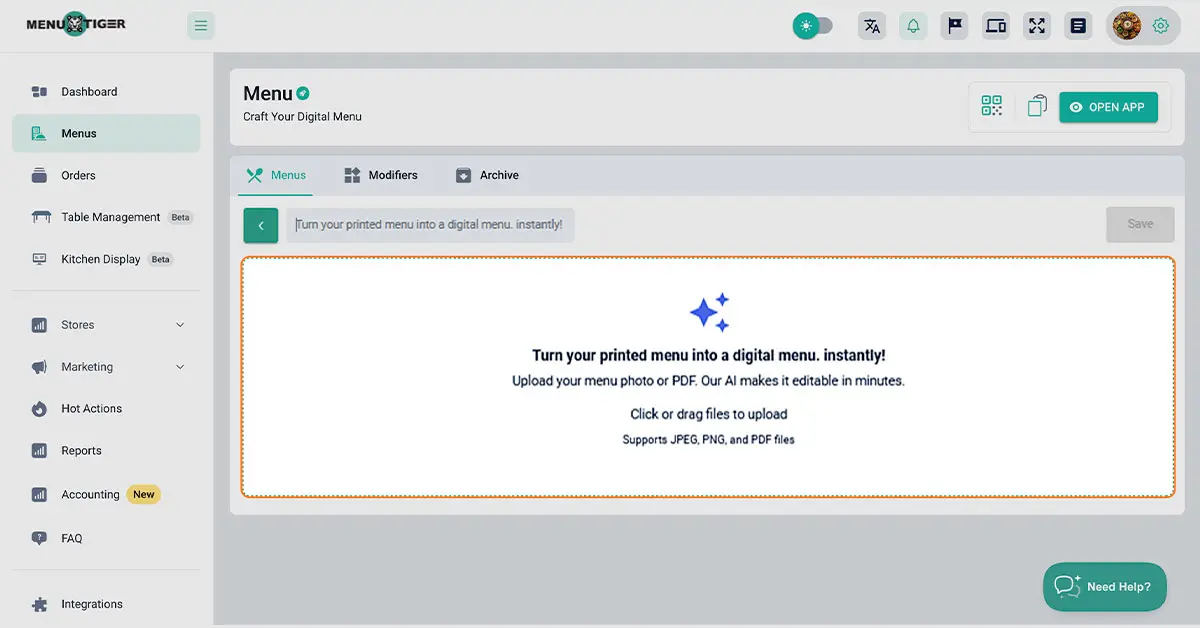
Click inside the upload box to open your file explorer. Select one or more images or PDF files of your printed menu, then click Open to upload them.
5. Review the generated menu and click save.
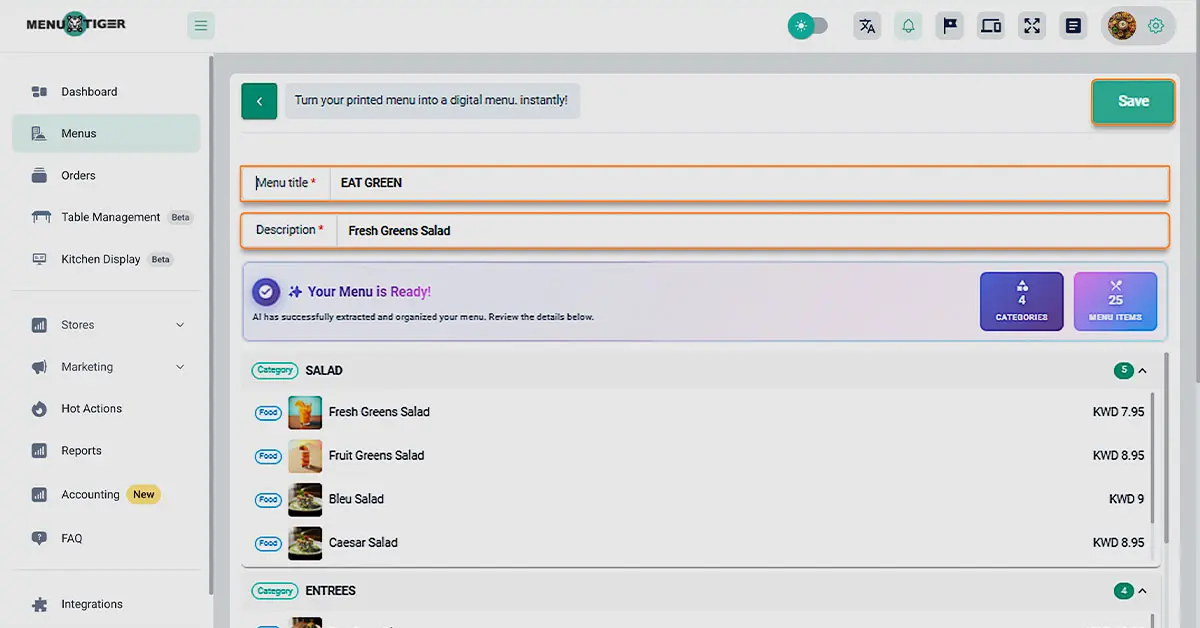
Once uploaded, the AI Menu Maker transforms your menu into digital mode within a few moments.
When finished, check the items, titles and descriptions and click Save.
This new menu will be displayed on the main menu page
6. Return to the main page to edit or add items to your menu.
Return to the main menu page and select the menu you just created. From there, you can add categories and items.
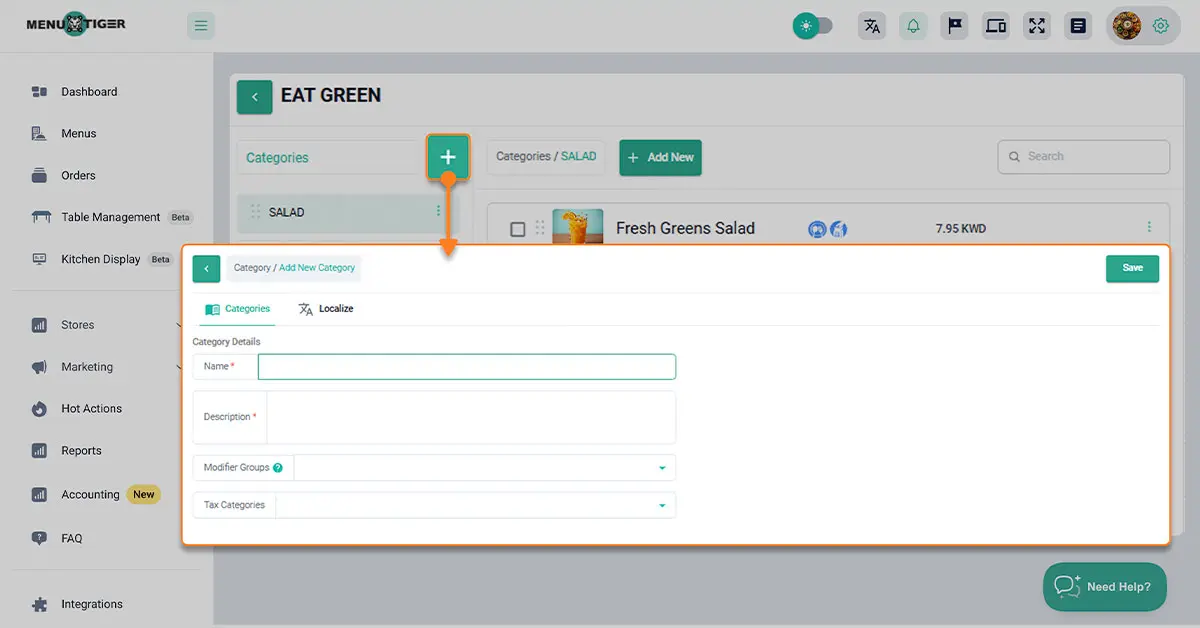
To add a new category, click the + button, enter the category details, and click Save.
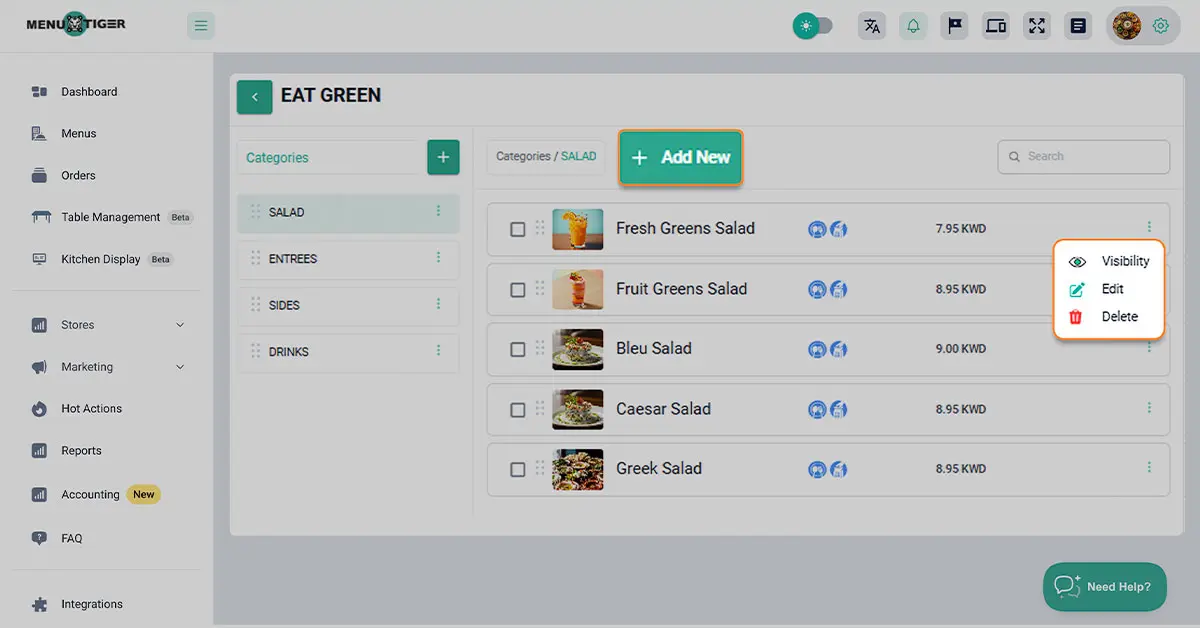
To add a dish under a category, click + Add New.
To edit an existing item, click the dish name or the three dots beside it.
You can update the following details:
- Item information
- Price options
- Modifier options
Once you’re done making changes, click Save.
7. Click the Store section to set up and manage your store.
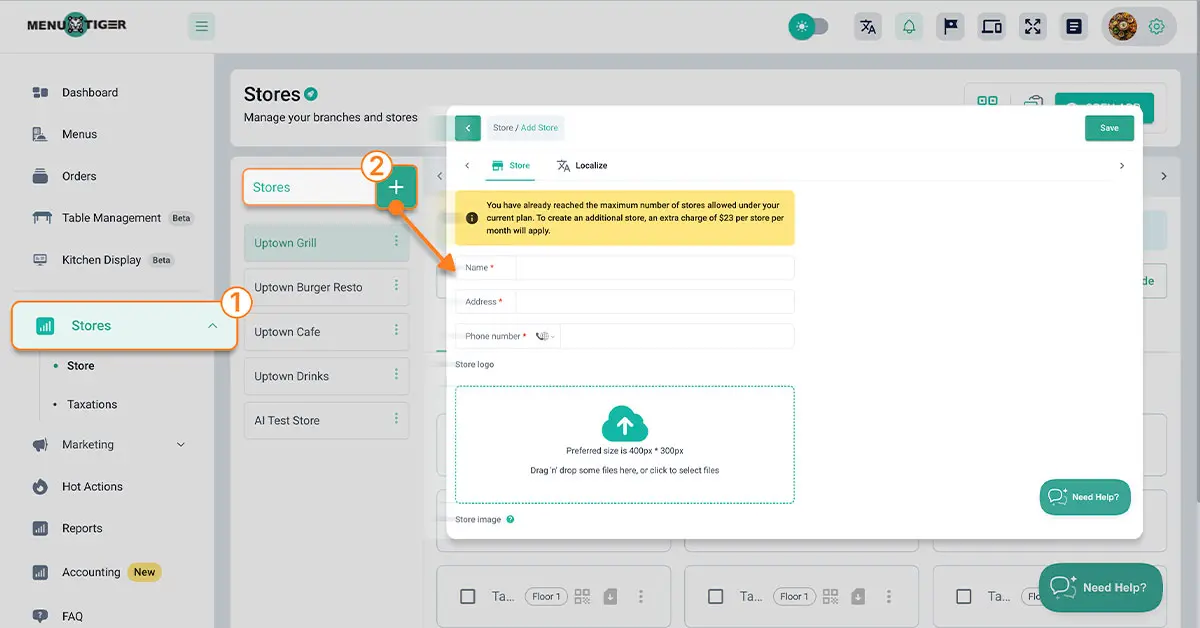
If you don’t have a store set up yet, click the + button and fill in the required information, then click Save.
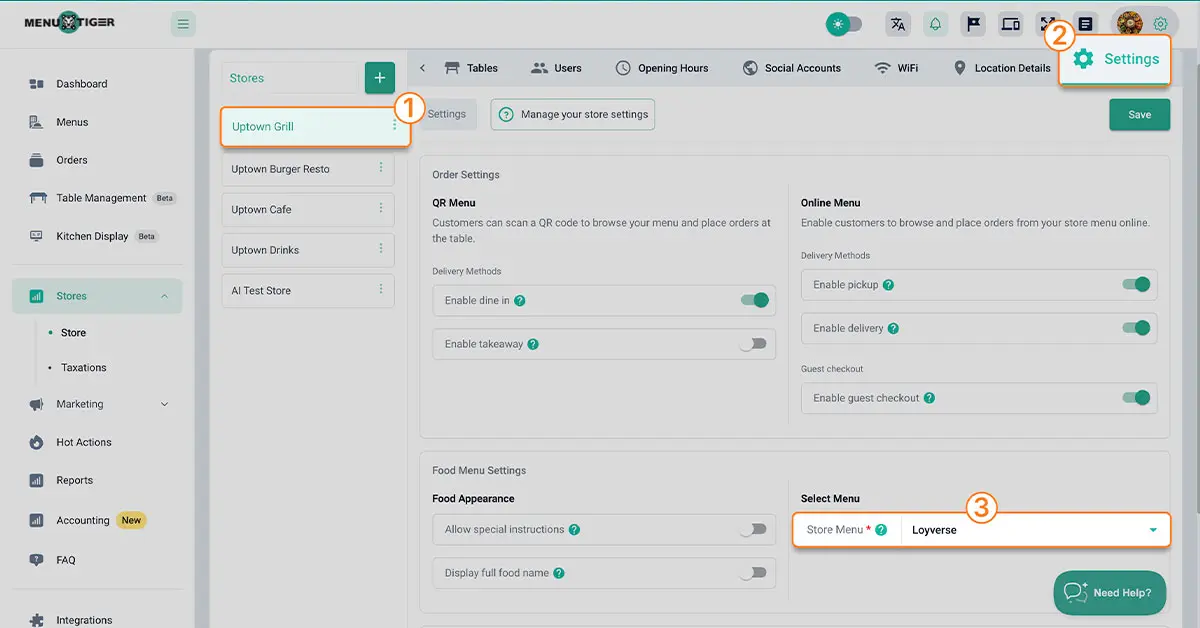
Once your store is created, select the store, go to Settings, find Store Menu, and choose the menu you created.
Once done, click Save.
8. Generate QR code for each table
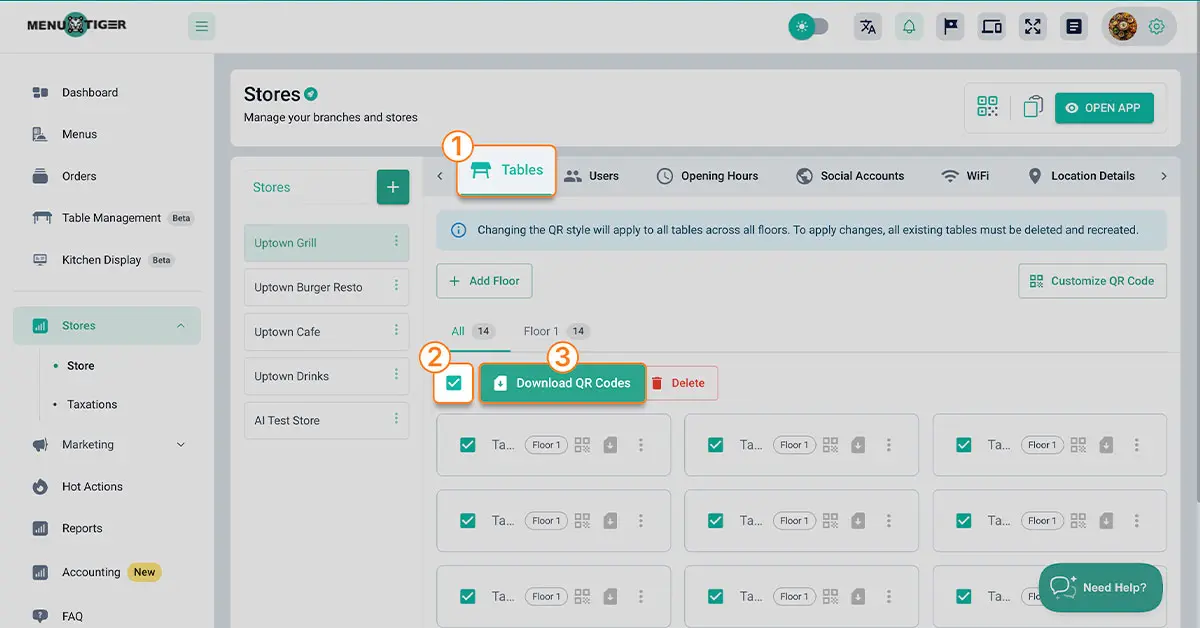
Once all setup is complete, go to “Table”, select the tables you want, and download the QR code for each.
Afterward, print the QR codes and display them on each table so customers can scan them using the tablet.
Note: You don’t need to repeat the setup on every tablet. Simply have customers open the tablet’s QR code scanner, and your interactive menu will appear instantly for them to use.
Paper menus are so last season. Go tablet with MENU TIGER.
Tablet menus will have a positive influence on every single aspect of your business—from upgrading the customer dining experience to facilitating daily operations, making for a perfect addition to take up in your business.
So, for this purpose, you should use digital tools such as a restaurant order management system to keep your business in the loop.
So, select a work instrument that is as reliable and functional to get the relevant change in your business.
FAQs

Eulla
Eulla joined MENU TIGER’s Content Team with a foundation in English teaching. She combines language expertise and creativity to produce engaging content that educates audiences and drives meaningful results.
Affiliates





© 2025 Menu Tiger. All rights reserved


